 AI Tools
 Health
 Math
Math Everyday Life
 Finance
 Physics
 Chemistry
 Statistics
 Construction
 Pets
Pets Time & Date
 Conversion Calculator
 Sign In
Pages
Category
Follow Us On:
Pages
Category
Follow Us On:
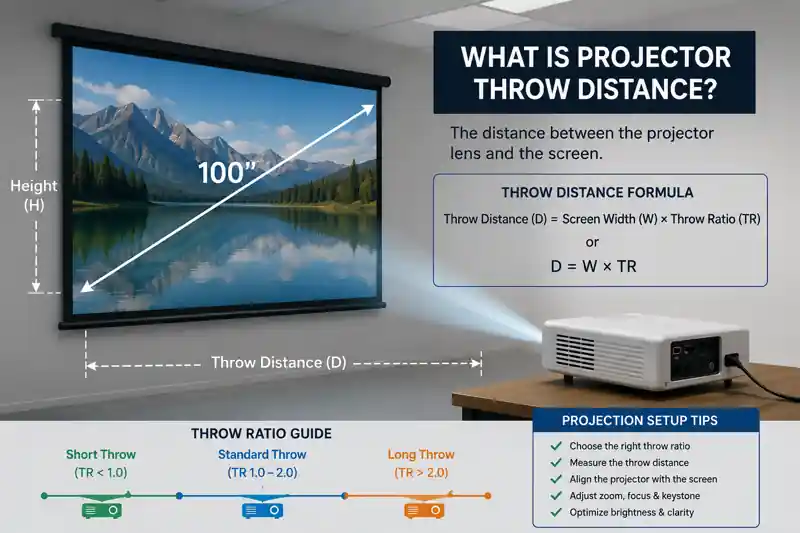
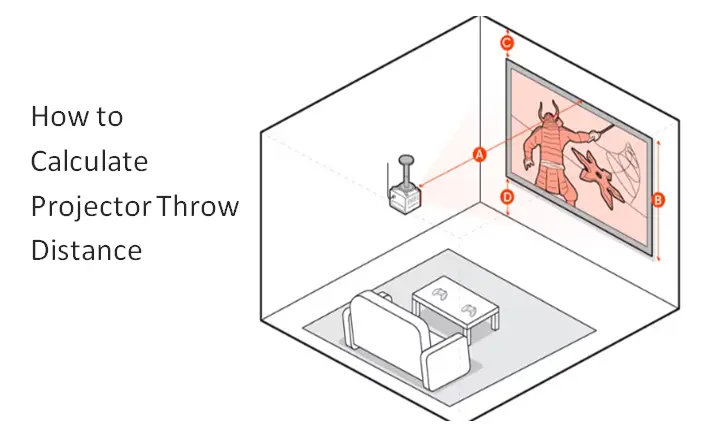
Imagine setting up a projector at home for a movie night or in the office for a presentation. You install the projector and turn it on, or notice that the image is either too small or too large for the screen. This means that projector placement is not just guesswork. It depends on using the correct measurements. One of the most important measurements in this regard is throw distance. It is the distance between the projector lens and the screen.
If you have ever wondered about “How far should a projector be from the screen?” you are not alone. Every projector is different. The wrong distance can make the image too small or too large. The good news is that you can easily find the right throw distance using simple formulas and helpful tools, or even with a few basic measurements.
In this blog, you will learn what throw distance is. How does the projector’s throw ratio affect image size? How to find the best setup for your room.
Projector Throw Distance:
When you set up a projector, one of the first things you need to know is how far it should be placed from the screen. This is known as the projector throw distance. This process directly affects the size and quality of the image. Think of it as the perfect distance between your projector and screen. The image will be sharp and properly fit on the screen if the distance is correct. If the distance is not correct. The image will be either too small or too large. This can make the image appear oversized or undersized and may reduce its visual quality. However, the size of the screens also matters. Using an online screen size calculator helps you to calculate screen dimensions and sizes that match your projector setup and room size.
Understanding projection throw distance can help you accurately position your projector without trial and error. Once you know the right placement. You can create a setup that fills your Screen perfectly. Whether you are working in a living room, a classroom, or a conference hall.
Understanding Throw Ratio:
The next thing to learn, what is the throw ratio after understanding the throw distance. This measurement helps you place your projector more accurately. In simple words, the throw ratio is the distance between the projector and the screen divided by the width of the image shown on the screen.
Throw Ratio = Distance ÷ Image Width
This number tells you how much space you need to achieve a certain screen size. The lower the throw ratio, the closer the projector can sit to the screen while still creating a large image. The higher the throw ratio, the more distance you will need. However, to find the exact image width based on your screen dimensions, simply calculate aspect ratio before selecting a projector type.
Projectors are generally grouped into three categories based on their throw ratios:
How To Calculate Throw Distance?
When you get complete knowledge about the throw ratio of projectors. The process of calculating the correct distance between the projector and screen becomes very easy. You can find this distance by using the following formula:
Throw Distance = Throw Ratio × Screen Width
The throw ratio is usually listed in the projector’s specifications. The screen width is the actual width of the screen. It is not the diagonal size that is commonly used in product descriptions. You get the distance the projector should be placed from the screen when you multiply these two values.
For example, if your projector has a throw ratio of 1.5:1 and your screen is 100 inches wide. You simply multiply 1.5 by 100. The result is shown as 150 inches or 12.5 feet. If you want to get the correct image size. You should place the projector about 12 and a half feet away from the screen.
If you already know the distance between the projector and the screen. Then divide that distance by the throw ratio to find the largest image width you can get.
However, if you want to skip the manual math, using an online projector calculator can instantly give you the accurate throw distance based on your screen size and projector specs.
This simple formula makes projector setup simple and easy. When you calculate the measurements before installing the display. You can avoid making assumptions and enjoy a clear and properly sized image right away.
Factors That Affect Throw Distance Accuracy:
Although the throw distance formula is simple. A few practical factors can affect the final result. The image may not look the way you expect if you ignore these factors.
Conclusion:
Throw distance is very essential in getting the perfect image quality from any projector. The right distance makes the image sharp and fits properly on the screen. Meanwhile, you can enjoy a better viewing experience by understanding throw distance and projector measurements. Therefore, it is necessary to calculate the proper distance before installing a projector. Check the projector’s throw ratio and do some math to find how far it should be placed from the screen, or do it instantly by using a projector calculator.

Last updated: June 17, 2026
Jacquelin Smith is an accomplished writer and a Researcher; She has done MS(Computer Science) and doing content writing for since 2019. She is an ardent writer and expert in Niches like Digital Marketing, Social media, Mathematics, etc. She is an expert writer and commentator at the same time.


Recent Posts
Links
Home Conversion Calculator About Calculator Online Blog Hire Us Knowledge Base Sitemap Sitemap TwoEmail us at
Contact Us© Copyrights 2026 by Calculator-Online.net
How was your experience today?
Not now
Awesome! Would you mind sharing that on Trustpilot?
Your review helps others find a tool that actually works.
Write a Review on TrustpilotNot now
Sorry to hear that
Tell us what went wrong — we read every message.
Not now
Thanks for your feedback!
We'll use it to make things better.